Announcement

Collapse
No announcement yet.

Help

Collapse
X
 
  • Filter
  • Time
  • Show
Clear All
new posts

  • Help

    Can't find a proper place to post this so trying here.

    New on here and have a few questions...

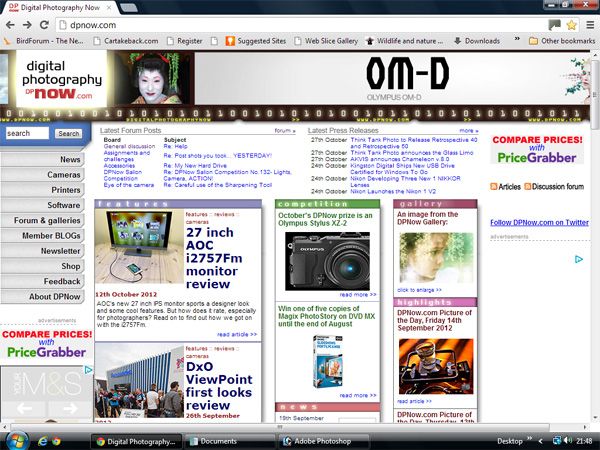
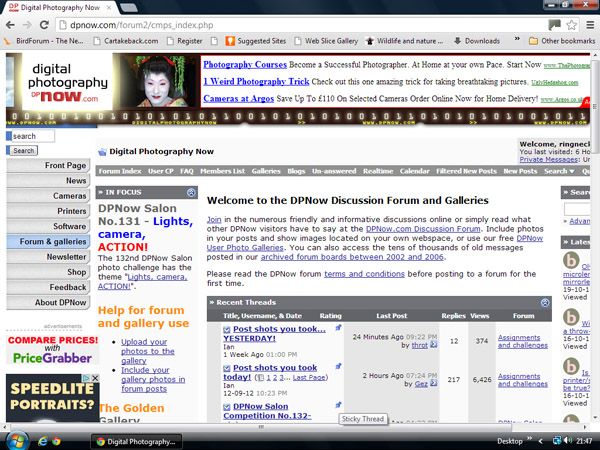
    Can someone explain why the home page fits my screen sideways yet every other page gets lost on the right hand side.Had same thing on E systems User group with people with giant screens loading giant images and we could only see them in snippets.

    There's always Ads down the left hand side which most times obscure the text underneath...thought it was a delete x in the corner but it just opened some load of rubbish....can I have the option to delete the Ads.

    Already put this one in the "how to get an image into the gallery thread but can I repeat it here....I wanted to know if the original tutorial (without sound) was still live as I find following text is easier if I open another page and run them together and follow the procedures.

    Thanks
    Keith

  • #2
    Re: Help

    Hi Keith, glad you sorted out registering here

    What screen resolution are you using?

    Ian
    Founder/editor
    Digital Photography Now (DPNow.com)
    Twitter: www.twitter.com/ian_burley
    Flickr: www.flickr.com/photos/dpnow/
    Pinterest: www.pinterest.com/ianburley/

    Comment


    • #3
      Re: Help

      Originally posted by Ian View Post
      Hi Keith, glad you sorted out registering here

      What screen resolution are you using?

      Ian
      Sorry but no idea......

      Still cannot find how to get a pic into the gallery...as I said before I could not access the text only tutorial for this.

      Keith

      Comment


      • #4
        Re: Help

        Usually it is advised to post images max 800 pix for longer side but some people ignore it. Sometimes it's needed to go bigger to get the details out but... yeah it's annoying to scroll
        For me it looks like getting rid of ads won't help you as the site menu is also there. What could help is zooming out the page with browser but doing that will make the text also smaller. What should be possible is that when posting images it automatically resizes it but that would probably require some script writing for Ian

        Comment


        • #5
          Re: Help

          Thanks...

          " What could help is zooming out the page with browser".....again no idea how to do that......and as you say it would be smaller and a pain to keep doing it on some pages and not others.

          This is the problem'''
          Home page.....


          and a forum page....missing edge.....


          The posting of images was a different thing I was on about...I want to do what the site wants us to ...put images into the gallery and then into the forums instead of how I did the 2 above...straight from photobucket.
          The tutorial (text only) cannot be accessed- only the one with sound -which I have trouble following.

          Thanks
          Keith

          Comment


          • #6
            Re: Help

            For IE there should be zoom option. Press "Alt" key and select View from the menu.
            Haven't viewed the page with my smaller laptop lately so don't remember exactly but you could be correct that site is optimized min 1280 pix in with or so.

            Placing images I do usually following:
            1. Resize it to 800x600 pix
            2. Log on Dpnow
            3. Open "Forum & galleries" from the left menu
            4. Open "Galleries" from the top menu
            5. Open "Upload Photos" from the 2nd top menu
            6. Under "Upload Photo" section click "Choose..."
            7. Pick the photo in opened window and press "Open"
            8. Press "Upload/Submit"
            9. Wait a bit
            10.Press "Process"

            Comment


            • #7
              Re: Help

              Thanks Throt......I now have a pic in my gallery.

              Cheers
              Keith

              Comment

              Working...
              X