 Tweet
Tweet
 Do you need to change your forum display mode?
I have just come to a realisation that because of the way the DPNow forum is configured, it may well be annoying a lot of users and even limiting the time that some members spend here - which is a real shame.
Until today, the when someone registers for the first time on the forum, the default thread display is for a threaded display mode, like this:
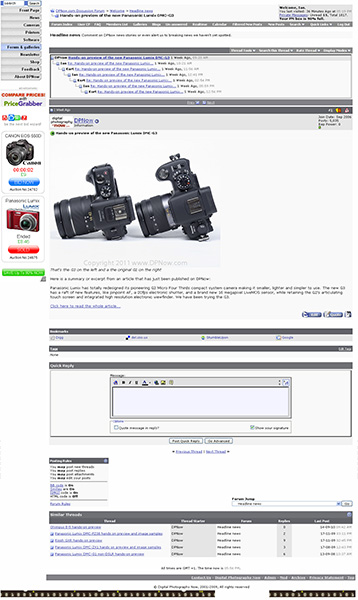
In some ways the threaded mode view is more powerful but I would agree that most discussion forums tend to default to the simpler and easier on the eye 'linear' view, like this:
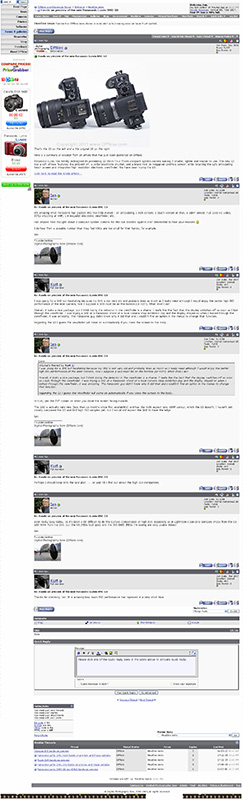
If you want your forum display to look like this by default and it isn't already, here is what to do (you need to be logged into the forum):
1. Go to the User CP (the band of options above the forum but below the main site navigation buttons, third from the left usually.
2. Then look for Settings & Options and then Edit Options - click on that.
3. Scroll down until you see the box labelled Threaded Display Options.
4. Change the Thread Display Mode to Linear - Oldest First.
5. Go right to the bottom of the page and click on Save Changes.
And that's it. From now on (unless you change it again) you will see the forum threads in linear mode, with the oldest posts at the top and the newest ones at the bottom.
I really hope that this makes the forum experience less frustrating for many of you and I can only apologise for this oversight.
Thanks!
Ian
Until today, the when someone registers for the first time on the forum, the default thread display is for a threaded display mode, like this:
In some ways the threaded mode view is more powerful but I would agree that most discussion forums tend to default to the simpler and easier on the eye 'linear' view, like this:
If you want your forum display to look like this by default and it isn't already, here is what to do (you need to be logged into the forum):
1. Go to the User CP (the band of options above the forum but below the main site navigation buttons, third from the left usually.
2. Then look for Settings & Options and then Edit Options - click on that.
3. Scroll down until you see the box labelled Threaded Display Options.
4. Change the Thread Display Mode to Linear - Oldest First.
5. Go right to the bottom of the page and click on Save Changes.
And that's it. From now on (unless you change it again) you will see the forum threads in linear mode, with the oldest posts at the top and the newest ones at the bottom.
I really hope that this makes the forum experience less frustrating for many of you and I can only apologise for this oversight.
Thanks!
Ian


Comment