If this is your first visit, be sure to
check out the FAQ by clicking the
link above. You may have to register
before you can post: click the register link above to proceed. To start viewing messages,
select the forum that you want to visit from the selection below.
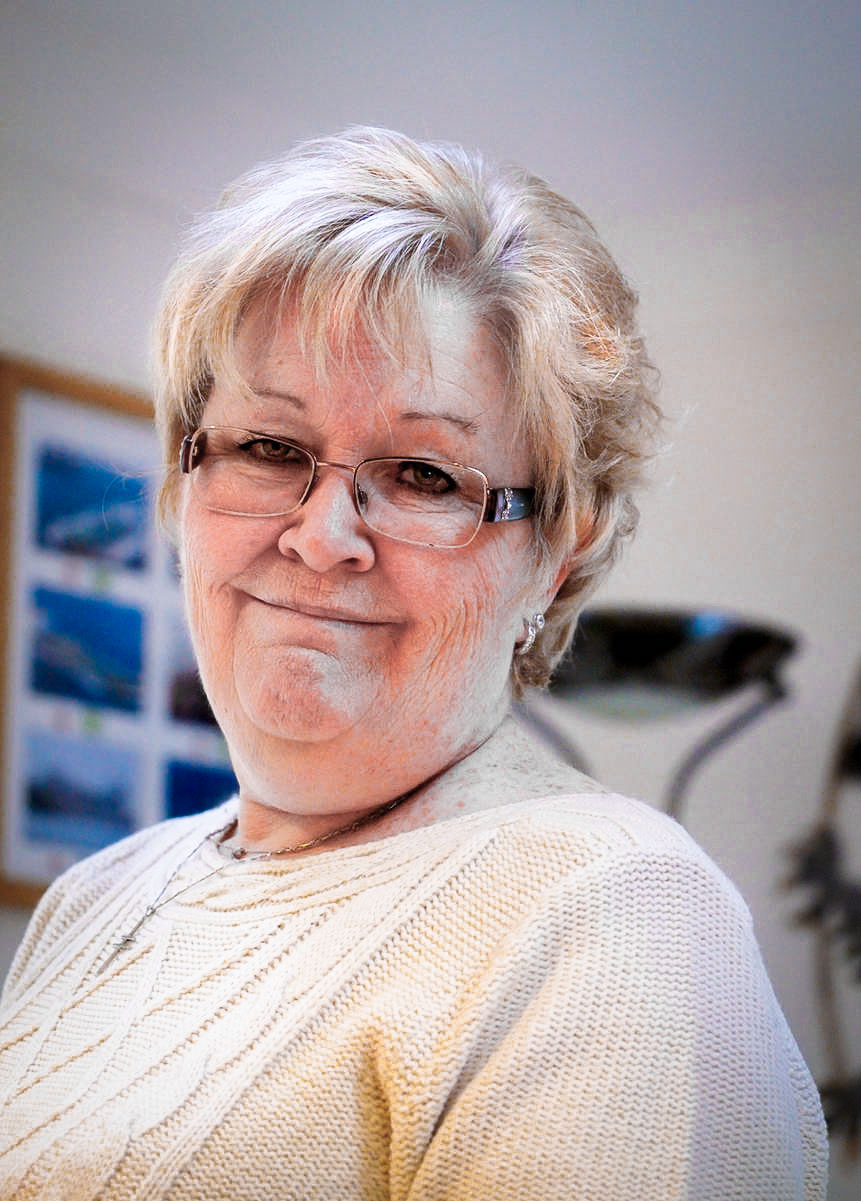
Quite impressed with it. Only fired off a couple of shots when I was at home and had no time to really set anything up. Only things I have tried in macro at the minute is some jewellery but will try and get out and about with it over the next couple of days. One of the missus before I left home;
Just because cliches are cliches does not make them wrong. I do like walking in the rain.
Not wishing to be a spoilsport here but this fine lady's face is not being done any justice with that orange hue!
Ian
That's no lady, that's my wife :-)
I actually agree Ian. I thought it was a wee bitty orangey myself but thought I would put it up near enough how it came out the camera. Plus my colour blindness lets me down at times.
As and aside Ian, how would you cut it down in CS5? Hue/Saturation or Colour Balance?
Just because cliches are cliches does not make them wrong. I do like walking in the rain.
The lighting is very strange - but the background looks OK, so I would guess her face has caught some warm light from a nearby artificial light source? Was the shot recorded in RAW? I would select (feathered) the orangey areas and make a white balance adjustment in Lightroom or a hue adjustment in Photoshop.
Was just as jpg Ian. Not sure where the warm light could have come from, unless it was my monitor maybe. I was sitting with my back to it. Only other light in the room is fluorescent and as you say the background is OK. I only threw the lens on and fired a couple of shots as it had just come before I was coming back to work so everything was on Auto. Never even noticed it was 1600 ISO so that is even more impressive for me. I don't have Lightroom on my laptop, just my desktop so will see what I can do in PS. It is actually one of the better pictures I have ever taken of her :-)
Just because cliches are cliches does not make them wrong. I do like walking in the rain.
... how would you cut it down in CS5? Hue/Saturation or Colour Balance?
Using CS5, I'd open Bridge, navigate my way to the image, right-click on it and choose 'open in Camera Raw' then go to the hue/saturation tools, choose the saturation tab of that group and reduce the reds by approx 25-30 and the same for the oranges.
If you're still not satisfied, try the hue tab of the same group of tabs and reduce the red saturation by approx 8-10. Then open into PS, check the jpg is how you want it and save.
That should do the trick.
Being able to open jpgs in ACR is one of the best functions ever imo!
Using CS5, I'd open Bridge, navigate my way to the image, right-click on it and choose 'open in Camera Raw' then go to the hue/saturation tools, choose the saturation tab of that group and reduce the reds by approx 25-30 and the same for the oranges.
If you're still not satisfied, try the hue tab of the same group of tabs and reduce the red saturation by approx 8-10. Then open into PS, check the jpg is how you want it and save.
That should do the trick.
Being able to open jpgs in ACR is one of the best functions ever imo!
Pol.
And here's a copy of the result I got using the method described above. Maybe the skin tones are slightly too pale but you can set your own levels of saturation and hue when you open the jpg in Adobe Camera Raw (ACR).
Thanks Pol and Ian, she is still beautiful :-). For some reason, I know not why, my ACR has decided to give me an error message and won't open anything! Must have just happened as I was using it on my laptop last trip. Strange. Anyway, no wahala as we say here. Impressed with the lens is where I was coming from. Now I need to get my butt out of the office and try it on other things :-)
Just because cliches are cliches does not make them wrong. I do like walking in the rain.
Thanks Pol and Ian, she is still beautiful :-). For some reason, I know not why, my ACR has decided to give me an error message and won't open anything! Must have just happened as I was using it on my laptop last trip. Strange. Anyway, no wahala as we say here. Impressed with the lens is where I was coming from. Now I need to get my butt out of the office and try it on other things :-)
Your software may simply need an update, option shown under 'help'. It doesn't mattae rthough as you could probably get what you want if you use the hue/saturation tools in the main Photoshop programme. There's no orange available in that one iirc but chooing the 'red' and tweaking the saturation and possibly a slight extra tweak the red hue should do it just as well.
Thanks Pol and Ian, she is still beautiful :-). For some reason, I know not why, my ACR has decided to give me an error message and won't open anything! Must have just happened as I was using it on my laptop last trip. Strange. Anyway, no wahala as we say here. Impressed with the lens is where I was coming from. Now I need to get my butt out of the office and try it on other things :-)
Your software may simply need an update, updater option is shown under 'help'. It doesn't matter though as you could probably get what you want if you use the hue/saturation tools in the main Photoshop interface. There's no orange available in that one iirc but choosng the 'red' and tweaking the saturation and possibly a slight extra tweak the red hue should do it for you.
We process personal data about users of our site, through the use of cookies and other technologies, to deliver our services, personalise advertising, and to analyse site activity. We may share certain information about our users with our advertising and analytics partners. For additional details, refer to our Privacy Policy.
By clicking "I AGREE" below, you agree to our Privacy Policy and our personal data processing and cookie practices as described therein. You also acknowledge that this forum may be hosted outside your country and you consent to the collection, storage, and processing of your data in the country where this forum is hosted.

 Tweet
Tweet

 :-)
:-)


Comment