Announcement

Collapse
No announcement yet.

Big Wasps Nest!

Collapse
X
 
  • Filter
  • Time
  • Show
Clear All
new posts

  • Big Wasps Nest!

    Took this today. Not sure what is going on though, so if anyone can shed any light I would be grateful!

    Looks as if the works are secreting something, at first I thought it was eggs, but apparently, the egg layers would be toward the centre of the nest, so my other guess is that maybe its the paper substance used to actually build the nest.

    Any ideas?

    ( I wish i had held out, and submitted this as part of the 'looking up' Salon! hehe)


    sigpic

  • #2
    Re: Big Wasps Nest!

    Hi Ben,

    From a Critique board point of view () - there is plenty to improve and I think I have definitely made some improvements:
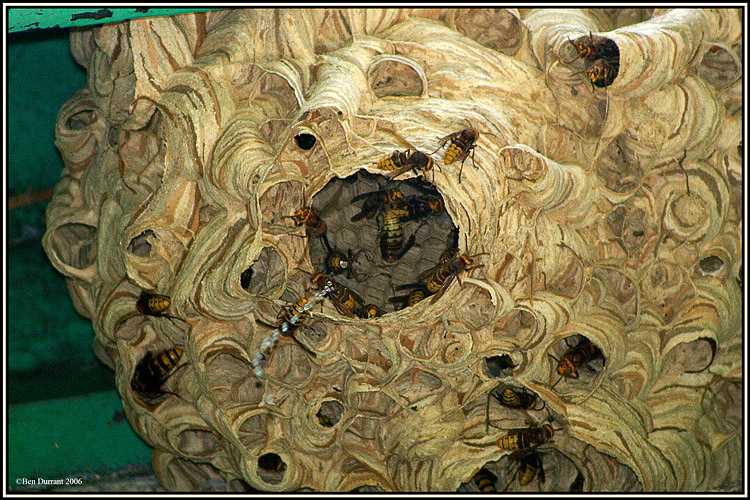

    But from a natural history point of view - it's a fascinating shot and rather scary too!

    Ian
    Founder/editor
    Digital Photography Now (DPNow.com)
    Twitter: www.twitter.com/ian_burley
    Flickr: www.flickr.com/photos/dpnow/
    Pinterest: www.pinterest.com/ianburley/

    Comment


    • #3
      Re: Big Wasps Nest!

      Originally posted by Ian View Post
      Hi Ben,

      From a Critique board point of view () - there is plenty to improve and I think I have definitely made some improvements:


      But from a natural history point of view - it's a fascinating shot and rather scary too!

      Ian
      Superb!
      Yes you have definately made some improvements, could you explain what you have done, looks like you have reduced the blue to me, but I would like to apply what you have done to the original.

      Thanks Ian.
      sigpic

      Comment


      • #4
        Re: Big Wasps Nest!

        Hi Ben, in Photoshop I used the Levels box (CTRL+L) and the black point eye-dropper on the darkest point in the image I could find. This cleaned up the blue cast and brought the yellow out. I then tidied up the histogram levels and, voila! If your image had some neutral grey areas (neutral in the original scene, I mean) in it, I might have managed the same sort of result using the grey dropper. The Levels tools are very handy for 80% plus of images!

        Ian
        Founder/editor
        Digital Photography Now (DPNow.com)
        Twitter: www.twitter.com/ian_burley
        Flickr: www.flickr.com/photos/dpnow/
        Pinterest: www.pinterest.com/ianburley/

        Comment


        • #5
          Re: Big Wasps Nest!

          Originally posted by Ian View Post
          Hi Ben, in Photoshop I used the Levels box (CTRL+L) and the black point eye-dropper on the darkest point in the image I could find. This cleaned up the blue cast and brought the yellow out. I then tidied up the histogram levels and, voila! If your image had some neutral grey areas (neutral in the original scene, I mean) in it, I might have managed the same sort of result using the grey dropper. The Levels tools are very handy for 80% plus of images!

          Ian
          Thanks Ian, generally, I do use the levels, but have never used the dropper tool!

          Well, had a play, using your advice, and I am pretty pleased with the result........what do you reckon?
          Attached Files
          sigpic

          Comment

          Working...
          X